What is a Workflow Builder? The Complete Enterprise Guide
Most enterprises don’t have a software problem. They have a process problem buried inside a software problem.
A purchase order gets stuck waiting on an approval that should take four hours, but takes four days because it lives in someone’s email inbox. A new employee’s laptop, credentials, and desk setup are still pending on day three because three different departments are waiting on one another without a shared system. A finance reconciliation that should close in 48 hours drags into a week because exceptions require manual follow-up with no visibility into status.
None of these are hard problems. They are coordination problems. And a workflow builder is how modern enterprises solve them, without hiring a team of developers, without a six-month IT project, and without replacing the systems your teams already use.
This guide breaks down what a workflow builder is, how it works at the enterprise level, which business processes it’s built to automate, and how to choose the right platform for your organization’s scale and complexity.
What is a Workflow Builder?
A workflow builder is a software tool that enables teams to design, automate, and manage multi-step business processes through a visual interface, without requiring traditional software development.
Instead of writing code to connect systems, assign tasks, or enforce approval rules, teams use drag-and-drop components to build automation logic that runs reliably at scale. A workflow builder translates the way your business actually operates, request comes in, someone reviews it, conditions are checked, an action fires, into a structured, repeatable digital process.
At its most fundamental level, a workflow builder answers three questions for every process it manages:
- What triggers the process? (A form submission, a system event, a scheduled time, an email received)
- What decisions govern its movement? (Conditions, approval hierarchies, exception rules, SLA thresholds)
- What actions does it execute? (Notifications, data updates, task assignments, integrations with other systems)
The output is a living automation, not a flowchart on a whiteboard, but a running process that executes consistently, tracks itself, and escalates intelligently when something goes wrong.
For enterprises operating across multiple geographies, departments, and legacy systems, a workflow builder is the connective tissue between tools that were never designed to talk to each other.
How Does a Workflow Builder Work?
Visual Drag-and-Drop Interface
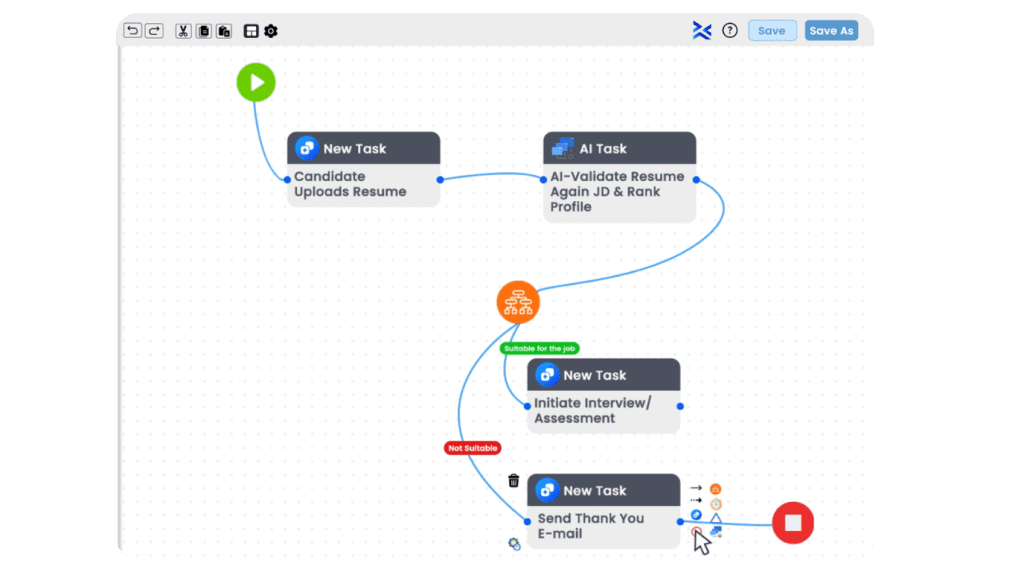
The defining characteristic of modern workflow builders is the canvas. Rather than writing logic in code, users assemble workflow components visually, dragging trigger nodes, condition blocks, action cards, and integration connectors onto a shared workspace and connecting them with directional paths.
This visual model serves two purposes that are underappreciated in most product comparisons. First, it makes the logic of a process immediately readable to non-technical stakeholders, a CFO reviewing an expense approval workflow can understand it at a glance, catch policy gaps, and approve it for deployment. Second, it dramatically reduces the cycle time for process changes. When an approval threshold changes, a business analyst modifies a condition node in the canvas rather than raising a developer ticket that may take weeks to action.
Enterprise-grade visual workflow builders layer on top of this with features like: zoom-out views for understanding large, multi-branch processes; role-based access so different teams can edit within their domains without disrupting shared logic; and version history so changes can be rolled back if a modification introduces unintended behavior.
Triggers, Conditions, and Actions
Every workflow, regardless of complexity, is built from three fundamental building blocks:
Triggers initiate a workflow. These can be event-based (a record is created in your CRM, a document is uploaded, a webhook fires from an external system), time-based (run at 9 AM every Monday, execute on the last business day of the month), or human-initiated (a user submits a form, clicks a button, or sends a specific message to an integrated channel).
Conditions control the flow of logic. They are the decision intelligence of the workflow, the IF-THEN-ELSE rules that route a request to one path versus another. An expense report under $500 routes automatically for manager approval; over $500 requires Finance Director sign-off; over $5,000 triggers a VP notification in addition to escalating to a specialized review queue. Conditions can be simple boolean checks or complex multi-variable logic depending on the platform’s capability.
Actions are what the workflow does at each stage. Sending a notification to a specific Slack channel. Creating a record in your ERP. Updating a field in your CRM. Generating a PDF document from a template. Assigning a task to a team member with a deadline. Calling an external API. The breadth of available actions, and the depth of integration within each, is one of the primary differentiators between enterprise-grade platforms and lightweight automation tools.
Integration Connectors
A workflow builder without deep integrations is an island. Its value is measured almost entirely by how well it connects to the systems your enterprise already depends on: your ERP, CRM, HRMS, document management platform, data warehouses, communication tools, and custom-built internal applications.
Enterprise workflow builders offer three integration models:
- Native connectors – pre-built, maintained integrations for common platforms like Salesforce, SAP, ServiceNow, Microsoft 365, Workday, and Slack that work out of the box
- REST API and webhook connectors – flexible integration paths for any system that exposes an API, giving technical teams the ability to connect proprietary or niche applications
- iPaaS integration layers – some platforms embed middleware capabilities, enabling event-driven data flows between systems without requiring a separate integration platform
The practical implication for a CTO evaluating platforms: an integration library that looks impressive on a features page may have connectors that are shallow, triggering basic events but unable to handle complex data payloads, pagination, authentication edge cases, or bi-directional sync. The depth of integration matters as much as the breadth.
Types of Workflow Builders
No-Code vs. Low-Code vs. Pro-Code Workflow Builders
The no-code/low-code/pro-code distinction is not simply a technical spectrum. It is a governance decision about who in your organization owns automation.
No-code workflow builders give business teams, operations managers, HR leads, finance analysts, procurement officers, the ability to build, deploy, and modify automations independently. They eliminate the IT backlog as the bottleneck for process improvement. The trade-off is that no-code tools are designed for configurability within guardrails, which means highly customized logic or deep system integrations may require escalation to technical teams regardless.
Low-code workflow builders combine visual interfaces with the ability to write code at specific points, for custom data transformations, complex conditional logic, or integration with systems that don’t have native connectors. Low-code is the sweet spot for enterprises that need flexibility without full development overhead. It lets business analysts drive the process design while technical staff extend the edges.
Pro-code workflow builders are developer-first environments that prioritize flexibility and performance at scale. They are appropriate for organizations with strong engineering teams building complex, high-volume automations where visual abstractions would be limiting rather than enabling.
Most mature enterprises need all three modes operating in the same platform, business teams deploying no-code workflows in their domains, with IT able to extend via low-code when the use case demands it.
Capability | No-Code | Low-Code | Pro-Code |
Who builds it | Business teams | Mixed (ops + IT) | Developers |
Time to deploy | Hours | Days | Weeks |
Customization depth | Medium | High | Maximum |
IT dependency | None | Partial | Full |
Best for | Departmental processes | Cross-system workflows | Complex, high-volume automation |
AI-Powered Workflow Builders
The emergence of AI workflow builders represents a qualitative shift in what workflow automation can do, not just an incremental improvement in speed.
Traditional workflow builders automate structured, deterministic processes: the rules are known, the paths are defined, the triggers are predictable. This covers a large percentage of enterprise process volume. But it leaves out a critical category of work: processes that involve judgment, ambiguity, unstructured inputs, or exceptions that don’t fit predetermined logic.
AI-powered workflow builders address this by embedding machine learning, natural language processing, and intelligent agents directly into the automation layer. This enables several capabilities that legacy tools fundamentally cannot replicate:
- Intelligent document processing – extracting structured data from invoices, contracts, and claims documents without requiring pre-defined templates or consistent formatting
- Semantic routing – directing incoming requests to the right workflow path based on understood intent rather than keyword matching
- Dynamic exception handling – identifying anomalies in a process and suggesting or executing resolution paths rather than simply escalating to a human queue
- Agentic automation – AI agents that can take multi-step actions autonomously, combining workflow execution with real-time reasoning based on available context
For enterprise leaders, the strategic implication is significant: the processes that previously required human judgment as an unavoidable bottleneck are now candidates for automation. Not full removal of human oversight, but intelligent routing that reserves human attention for genuinely complex decisions rather than routine exception handling.
7 Business Processes You Can Automate with a Workflow Builder
- Procurement Approvals
The procurement cycle is one of the most universally broken processes in enterprise organizations. Purchase requisitions move through approval chains by email, get lost in shared inboxes, and lack any real-time visibility for the finance team managing budget adherence.
A workflow builder automates the full cycle: a requisition is submitted through a structured form, conditional logic routes it to the appropriate approver based on spend category and value threshold, the approver receives a contextualized notification with one-click approval capability, and the approved request automatically triggers a purchase order in the ERP system. Exceptions, missing budget codes, vendor compliance flags, duplicate purchase detection. are handled by rule-based logic before they reach a human reviewer.
The result is not just a faster approval. It is a procurement process with a complete audit trail, real-time budget tracking, and measurable SLA performance.
- HR Onboarding
New hire onboarding involves an average of 54 separate activities according to industry research, spanning IT provisioning, payroll enrollment, benefits selection, compliance acknowledgments, equipment assignment, and department-level orientation. The majority of these activities involve different teams with no shared coordination system, which is why the average onboarding experience still involves a new employee spending day one chasing down their own laptop access.
An automated onboarding workflow triggers the moment an offer letter is signed. It simultaneously initiates equipment provisioning requests with IT, kicks off payroll enrollment in the HRMS, schedules compliance training assignments in the LMS, and sends personalized welcome sequences with task checklists to the new hire and their manager. Every step has an owner, a deadline, and an escalation path if the deadline is missed.
- Finance Reconciliation
Month-end close is a recurring operational bottleneck for finance teams. The reconciliation process involves matching transactions across multiple systems, investigating variances, obtaining sign-offs, and producing documentation that satisfies audit requirements. Most of this work is serial, manual, and depends on the availability of individuals across the business.
Workflow automation addresses the structural inefficiencies: automated data pulls from banking systems, ERP ledgers, and expense platforms; rule-based variance detection that flags only genuine exceptions rather than requiring manual review of every transaction; conditional routing of variance investigations to the correct account owners with defined response windows; and automated generation of reconciliation sign-off documentation when all exceptions are resolved.
- Manufacturing Quality Checks
Quality control in manufacturing generates high volumes of structured data, inspection results, defect classifications, batch test outcomes, equipment calibration records, that must flow to the right people and systems in real time for production decisions to be made accurately.
Workflow automation connects the shop floor to quality management systems and escalation paths: a failed inspection automatically triggers a production hold notification to the line supervisor, a defect classification workflow that routes specimens to the appropriate QA team, a root cause investigation task with a defined response SLA, and a supplier notification process for defects traceable to inbound materials. Compliance documentation for ISO and regulatory audits is generated automatically from workflow execution data.
- Healthcare Patient Workflows
Healthcare organizations manage patient journeys that span clinical, administrative, and insurance processes, each involving different systems, different teams, and different compliance requirements. The cost of workflow failures here is not just operational; it directly affects patient outcomes.
Workflow builders automate the coordination layer: appointment scheduling with automated pre-visit communications and document collection, prior authorization workflows that submit requests to payers with all required clinical documentation attached, post-visit follow-up sequences, referral management processes that ensure specialist handoffs have complete patient history, and discharge workflows that coordinate pharmacy, transport, and follow-up care scheduling simultaneously.
- Retail Order Management
The post-purchase order management process in retail involves coordination across inventory, fulfillment, logistics, customer service, and finance, typically across systems that were implemented at different times with minimal integration. Returns and exceptions multiply this complexity.
Workflow automation handles the full order lifecycle: order receipt triggers inventory reservation and warehouse pick-request creation; shipping confirmation fires customer notification sequences; delivery exceptions trigger automated resolution workflows with defined escalation paths; return authorization processes route requests to the appropriate fulfillment center and initiate refund workflows based on return condition and policy.
- Insurance Claims Routing
Claims processing is the moment of truth in insurance. The speed and accuracy with which a claim is assessed and resolved is the primary driver of customer retention, and also the largest source of operational cost for the carrier.
AI-powered workflow builders transform claims routing: incoming claims are automatically classified by type, severity, and documentation completeness using intelligent document processing; complete, low-complexity claims route directly to automated adjudication; incomplete or high-complexity claims route to specialist handlers with all available context pre-populated; fraud risk scores trigger parallel review workflows; and settlement approvals execute with automated payment disbursement upon sign-off.
Workflow Builder vs. BPM Platforms, What’s the Difference?
This question comes up constantly in enterprise technology evaluations, and the confusion is understandable because the product marketing of both categories has become deliberately blurred.
Here is the clear distinction:
A workflow builder automates specific, repeatable tasks within a function or department. It is execution-focused, designed to ensure that a defined sequence of steps happens reliably, with the right people involved, in the right order, within defined time windows.
A BPM (Business Process Management) platform manages end-to-end organizational processes with a full lifecycle perspective: modeling, analysis, execution, monitoring, and continuous optimization. BPM treats workflow automation as one capability within a broader process management discipline that also includes process mining, performance analytics, simulation, and organizational governance.
If a workflow is how a plane lands, a defined sequence of tasks performed by specific roles, then BPM is the operation of the entire airport.
The practical decision framework for enterprise leaders:
Scenario | Use Workflow Builder | Use BPM Platform |
Automating a single departmental process | ✓ | |
Cross-department process governance | ✓ | |
Need to deploy in days/weeks | ✓ | |
Regulatory compliance & audit trails | Depends on platform | ✓ |
Business users building their own automations | ✓ | |
Enterprise-wide process transformation | ✓ | |
Budget-conscious, targeted automation | ✓ | |
Process performance benchmarking | ✓ |
The emerging reality is that the boundary between these categories is collapsing. Modern no-code/AI workflow builders like Tentoro are delivering BPM-grade governance, analytics, and compliance capability within a visual builder experience that business teams can operate independently, without the implementation complexity and cost overhead that traditional BPM suites have historically required.
How to Choose a Workflow Builder for Your Enterprise
The market for workflow automation platforms is dense and the feature surface area of any given vendor’s marketing page is intentionally overwhelming. Here is the decision framework that cuts through it.
- Start with who will build and own the workflows. If your answer is “business operations teams with minimal IT involvement,” you need a no-code-first platform with enterprise guardrails, not a developer tool with a visual interface bolted on. The distinction is in the governance model: can IT set rules and boundaries within which business teams operate freely, without requiring IT to approve every workflow?
- Audit your integration landscape honestly. List the ten systems your most important processes run across today. Before evaluating any platform, confirm that those specific integrations exist, are maintained, and handle the data flows you need, not just the high-level “we integrate with Salesforce” claim. Ask vendors for references who have run your exact integration scenarios.
- Demand AI capability that is production-ready, not roadmap. The AI workflow builder category is full of vendors who have added AI branding to rules-based automation. Genuine AI capability means intelligent document processing that handles real-world variance, routing logic that interprets intent rather than just pattern-matching keywords, and agent orchestration that can handle multi-step tasks autonomously. Ask to see a live demonstration, not a slide.
- Evaluate governance for enterprise scale. For organizations with thousands of workflows across dozens of departments, the management layer matters as much as the building layer. Role-based access controls, workflow versioning, audit logging, SLA monitoring dashboards, and the ability to deprecate or modify workflows without business disruption, these are the capabilities that determine whether an organization can operate workflow automation at scale or whether it becomes ungovernable chaos.
- Total cost of ownership, not license cost. The platforms with the lowest license costs often have the highest implementation and customization costs. Evaluate: how long does it take to build and deploy a typical workflow? How much of that work requires vendor professional services or IT involvement? What does the change management cost when a process needs to be updated? The platforms that enable business teams to self-serve recoup their cost premium many times over.
- Security and compliance posture. For organizations in regulated industries or global markets, data residency, SOC 2 certification, GDPR compliance, role-based data access controls, and encryption standards are non-negotiable. These requirements should be validated before evaluation, not discovered at the procurement sign-off stage.
Why Tentoro’s AI Workflow Builder Outperforms Legacy Tools
Legacy workflow tools were built for a world where IT owned automation and business teams submitted requests. That model worked when processes were stable, digital footprints were small, and the pace of change was manageable. None of those conditions apply to enterprise operations in 2025.
Tentoro was built from the ground up for the inverse reality: business teams own their processes, IT governs the platform, and AI handles the complexity that previously required developer intervention.
The visual builder is genuinely no-code. Not “no-code for developers”, which is a real category that is unfortunately common, but a canvas that a procurement manager, HR business partner, or operations lead can sit down with and build a production workflow in a single session. The distinction matters because the value of workflow automation compounds when business teams are empowered to improve their own processes continuously, rather than queuing change requests with IT.
The AI layer is native, not an add-on. Tentoro’s AI workflow builder integrates intelligent agents directly into workflow execution, not as a separate module but as a first-class capability within the same canvas. This means an operations team can build a workflow that uses AI to extract data from uploaded documents, make a routing decision based on semantic analysis of the content, and execute a downstream action in a connected system, all within the same visual workflow they designed themselves.
Enterprise governance is built in, not bolted on. Workflow versioning, role-based access controls, audit logging, SLA tracking, and cross-department visibility are core platform capabilities, not enterprise tier add-ons. This means an organization with hundreds of active workflows across functions maintains full operational visibility without additional tooling or custom reporting.
The integration depth is real. Tentoro’s connector library covers the enterprise systems that actually run modern operations — ERPs, CRMs, HRMS platforms, document management systems, communication tools, with deep integration that handles the data complexity of production environments, not just the simple trigger-and-notify scenarios most platforms demonstrate.
For CTOs and CIOs evaluating the category: the right question is not which vendor has the most features. It is which platform your operations teams will actually use to improve their processes independently, because that is where the compounding return on workflow automation lives.
Getting Started, Build Your First Workflow in 15 Minutes
The fastest path from concept to running automation follows a consistent pattern for Tentoro customers, regardless of the process being automated.
Step 1: Define the process in plain language first (5 minutes) Before touching the canvas, write out the process as your team actually executes it today, not as it should theoretically work. Who initiates it? What information do they provide? Who needs to act on it, and in what order? What are the conditions that send it down different paths? What needs to happen in other systems when each step completes? This clarity on paper is what makes the build fast.
Step 2: Configure your trigger (2 minutes) In Tentoro’s canvas, select your trigger type, form submission, system event, scheduled time, or API call, and configure the inputs. If your process starts when someone submits a request, your form fields become the data that flows through every subsequent step.
Step 3: Build your logic layer (5 minutes) Add your condition nodes. Set the rules that determine which path the workflow takes based on the data it receives. Approval thresholds, escalation conditions, exception routing, each is a configuration choice in the visual builder, not a line of code.
Step 4: Wire your integrations and actions (3 minutes) Connect the systems that need to act at each stage. Assign tasks to individuals or roles. Configure notifications. Set SLA timers and escalation paths. Connect your ERP, CRM, or communication tools through Tentoro’s native connectors.
Step 5: Test with a live submission Run a test case through the workflow before deploying. Verify the routing logic, confirm the integrations fire correctly, and validate the notifications reach the right people in the right format. Adjust any conditions that behave unexpectedly. Deploy.
The first workflow is the hardest. The second takes half the time. By the fifth, your business teams are building independently.
Conclusion
Workflow complexity doesn’t announce itself. It accumulates quietly, in the email threads used to chase approvals, in the spreadsheets that substitute for real process visibility, in the hours your best people spend on coordination work instead of the decisions only they can make.
A workflow builder doesn’t just speed up those processes. It structurally removes the friction that was always accepted as the cost of doing business at scale.
The enterprises that will operate with the sharpest margins and fastest decision cycles over the next five years aren’t necessarily the ones with the most headcount or the largest IT budgets. They are the ones that have automated the repeatable, freed their teams to focus on the complex, and built a process infrastructure that can change as fast as the business demands it.
That is what an AI-powered, no-code workflow builder enables, not a productivity improvement, but an operational model shift.
The question is not whether your enterprise needs workflow automation. Every process audit answers that question within the first hour. The question is whether you choose a platform that puts that capability in the hands of the people who understand your processes best, your operations, finance, HR, and procurement teams, or one that keeps it locked behind an IT queue.
Tentoro was built to answer that question definitively. Your teams own the process. The AI handles the complexity. IT governs the platform without becoming the bottleneck.
FAQ's
A workflow builder is a software tool that lets teams design, automate, and manage multi-step business processes through a visual interface, without writing code. Instead of building automations through development projects, teams use drag-and-drop components to connect triggers, conditions, and actions across the systems their business already uses. The result is a running, self-executing process that handles routine coordination, approvals, notifications, and integrations automatically and consistently.
A workflow builder automates specific, repeatable tasks within a department or function, it is execution-focused. A BPM (Business Process Management) platform manages end-to-end organizational processes with a full lifecycle perspective: modeling, analysis, execution, monitoring, and continuous optimization. Think of a workflow as how one plane lands; BPM is the operation of the entire airport. Modern platforms like Tentoro are closing this gap, delivering BPM-grade governance and analytics within a no-code builder experience that business teams can operate without IT dependency.
Virtually any repeatable, rule-based business process is a candidate for automation. The most common starting points for enterprise teams include procurement approvals, HR onboarding, finance reconciliation, manufacturing quality checks, healthcare patient workflows, retail order management, and insurance claims routing. The practical test: if your team executes the same sequence of steps more than a handful of times per week, and those steps involve routing information between people or systems, a workflow builder can automate it.
An AI workflow builder adds machine learning, natural language processing, and intelligent agents to traditional automation. Where conventional workflow builders follow rigid if-then rules, AI-powered workflows can interpret unstructured data, extracting information from documents, classifying requests by intent, detecting anomalies in data, and make context-aware routing decisions dynamically. This extends automation into processes that previously required human judgment as an unavoidable bottleneck: invoice processing with inconsistent formats, claims triage, contract review routing, and exception handling in high-volume operational workflows.
With a no-code workflow builder like Tentoro, a straightforward departmental workflow, a procurement approval, an onboarding sequence, a finance exception routing process, can be built, tested, and deployed within a single working session. More complex workflows involving multiple systems, conditional branching across departments, and AI-powered decision steps typically take days rather than weeks. The variable that matters most is not the platform's complexity ceiling but whether business teams can build and modify workflows independently, without queuing IT requests for every change.
Enterprise-grade workflow builders are built with security requirements that mirror the sensitivity of the processes they automate. The capabilities to validate before deployment include: SOC 2 Type II certification, role-based access controls that limit who can view, build, or modify workflows, full audit logging of every workflow execution and data access event, data encryption at rest and in transit, and configurable data residency for organizations with regulatory requirements across geographies. For organizations in regulated industries , healthcare, financial services, insurance, also confirm HIPAA, GDPR, and relevant regional compliance posture directly with the vendor.
The decision comes down to six factors: who in your organization will own and build workflows (business teams vs. IT), the depth of integrations with your existing system landscape, whether the AI capabilities are production-ready or marketing-layer, the governance model at scale (versioning, access controls, audit logs), total cost of ownership rather than license cost alone, and the vendor's security and compliance certifications. The most important signal is whether business teams, not just developers, can build and modify their own workflows independently. That is where the compounding operational value of workflow automation lives.