Excel to App: How to Convert Any Spreadsheet into a Business Application
There is a spreadsheet running something important in your business right now and someone on your team is holding their breath every time someone else opens it.
Maybe it is the inventory tracker with formulas referencing cells four sheets deep, which silently breaks whenever someone adds a row in the wrong place. Maybe it is the purchase order log that lives on one person’s laptop, which means nothing moves when they are out of office. Maybe it is the employee attendance sheet that started as a simple grid two years ago and has since grown into a 47-column monster that takes 20 minutes to update and produces reports nobody fully trusts.
Excel is not the problem. The problem is that spreadsheets were designed for calculations and data storage not for running live business operations at scale. When they get stretched into that role, which happens at every organization with a pulse, they become fragile, unauditable, and invisible to everyone except the person who built them.
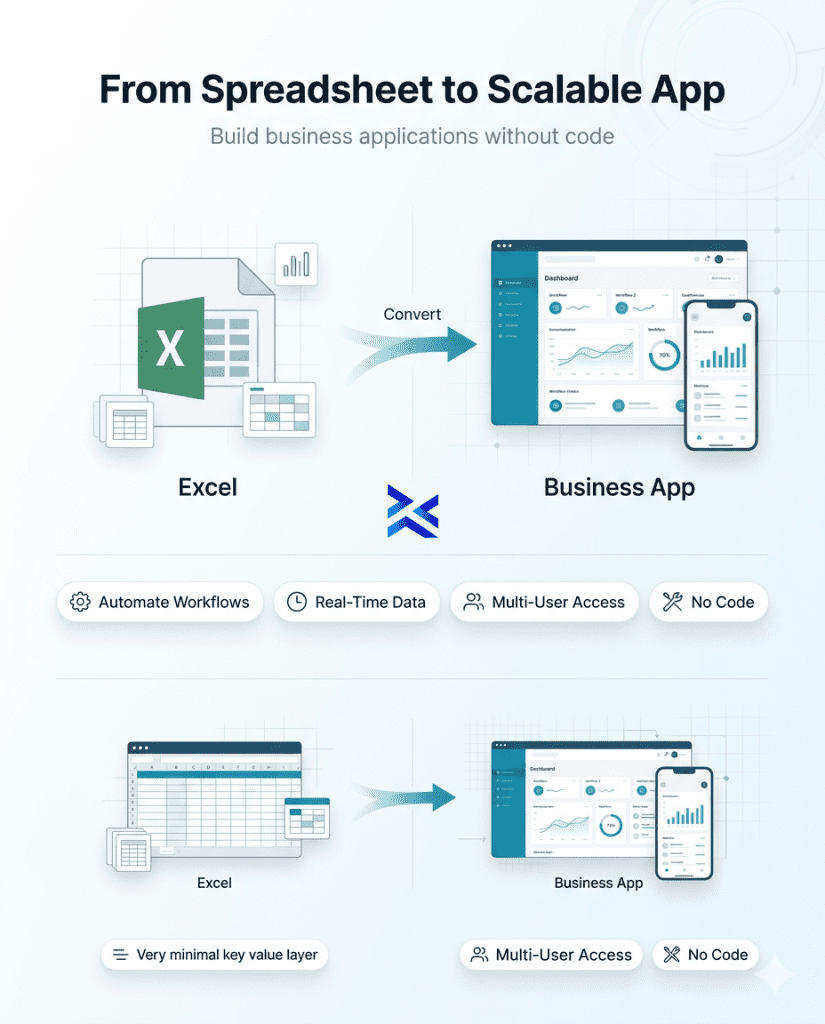
The good news: you do not have to rebuild anything from scratch. An Excel to app converter takes the spreadsheet you already have your columns, your logic, your data and turns it into a purpose-built business application that multiple people can use, from any device, with role-based permissions, automated workflows, and real-time visibility.
This guide shows you exactly how that works, what it delivers, and how to get a working app from your existing spreadsheet in minutes not months.
Why Businesses Are Moving Beyond Excel
The Hidden Cost of Spreadsheet-Driven Operations
The conversation about replacing spreadsheets always starts in the wrong place. Leaders ask, “How much will a new system cost?” when the right question is, “How much is our current system already costing us?”
The answer is consistently more than anyone expects.
Research consistently puts the spreadsheet error rate at around 88–90% meaning nearly nine in ten spreadsheets in active business use contain at least one mistake. Some are cosmetic. Some are consequential. A widely reported example: a copy-paste error in a risk model spreadsheet contributed to a multi-billion-dollar trading loss at a major financial institution. That is the extreme end of the scale. The daily reality for most enterprises is subtler but no less costly decisions made on data that is three days stale, approvals bottlenecked because the file is “checked out,” and operational knowledge locked inside a workbook that only one person truly understands.
The time cost is equally significant. Research by ProcessMaker found that the average office worker spends around three hours per week working directly in spreadsheets with more than 1,000 copy-paste actions performed weekly. Scaling that across a finance team of 20 people means 60 hours per week, or the equivalent of 1.5 full-time employees, spent purely on spreadsheet maintenance rather than value-generating work.
There is also the collaboration problem. Spreadsheets were built for single users. Shared access was retrofitted, and it shows. The moment more than two or three people need to work in the same file, version conflicts appear. People create personal copies “to be safe.” Decision-makers receive reports built on different versions of the same data without knowing it. The spreadsheet that was meant to create a single source of truth becomes a generator of disagreement.
Excel vs. Purpose-Built Apps- The Honest Comparison
It is worth being clear about what Excel is genuinely excellent at because the answer shapes when conversion makes sense and when it does not.
Capability | Excel | Purpose-Built App |
Complex financial modeling | ✅ Excellent | ⚠️ Depends on platform |
Ad hoc data analysis | ✅ Excellent | ❌ Not designed for this |
Multi-user data entry | ⚠️ Problematic | ✅ Designed for this |
Mobile access | ❌ Poor experience | ✅ Native mobile support |
Role-based permissions | ❌ All-or-nothing | ✅ Granular by field/role |
Automated workflows & approvals | ❌ Manual or complex macros | ✅ Native, no-code |
Audit trails | ❌ No native logging | ✅ Complete record of every action |
Real-time dashboards | ⚠️ Static, manual refresh | ✅ Live, auto-updated |
Data validation & integrity | ⚠️ Easily overridden | ✅ Enforced at the field level |
Scalability across teams | ❌ Degrades with scale | ✅ Designed for enterprise scale |
The conversion decision is straightforward: if a spreadsheet is primarily used for analysis or modeling, keep it in Excel. If it is primarily used for operations data collection, tracking, approvals, reporting across teams it belongs in an app.
What is an Excel to App Converter?
An Excel to app converter is a no-code platform that reads your spreadsheet’s structure its columns, data types, dropdown lists, numeric fields, date fields, and relationships between tables and generates a functional web or mobile application on top of that same data.
The transformation is not cosmetic. The output is not a prettier interface over the same spreadsheet. It is a structurally different object: a governed, multi-user application with enforced data validation, configurable access controls, built-in workflow automation, and real-time visibility all built from the foundation of data and logic your team has already defined in the spreadsheet.
How the Conversion Process Works
The mechanics of conversion follow a consistent pattern across modern platforms:
Structure extraction: The platform reads your spreadsheet’s column headers and infers data types text fields, numeric fields, date fields, dropdown selectors, boolean flags. This becomes the data schema for your app.
Interface generation: Based on the data schema, the platform generates default views: a data entry form, a list view, a detail view. These serve as the starting point for your app’s user experience, which you then customize through the visual builder.
Logic mapping: Conditional formatting rules, data validation constraints, and dropdown options from your spreadsheet are mapped to equivalent app-layer logic validation rules, field-level conditions, and select inputs.
Workflow configuration: This is where the app exceeds what the spreadsheet could ever do. You add approval steps, automated notifications, escalation triggers, and role assignments transforming the spreadsheet from a passive data store into an active process management tool.
Deployment: The app is published to a URL accessible from any browser or mobile device. Users interact with it through their assigned role’s interface field workers see data entry forms, managers see dashboards and approval queues, executives see summary reports.
What Gets Mapped: Columns, Formulas, Dropdowns, Relationships
Understanding what converts cleanly and what requires configuration helps set realistic expectations:
Columns → App fields: Each column header becomes a labeled field in your app. Text columns become text inputs, number columns become numeric inputs with optional formatting, date columns become date pickers, and yes/no columns become toggle switches or checkboxes.
Dropdown lists → Select inputs: Data validation dropdown lists from your spreadsheet become native select fields in the app, with the same option lists enforced at the UI layer rather than relying on the user to stay within the dropdown.
Formulas → Calculated fields: Simple arithmetic formulas totals, percentages, running balances map to calculated fields in the app. Complex nested formulas may require reconfiguration in the app’s formula builder.
Relationships → Linked tables: If your spreadsheet uses VLOOKUP or INDEX/MATCH to pull data between sheets, these relationships become linked data tables in the app enabling proper relational data management without the formula fragility.
Access control → Role-based permissions: The most important thing that gets added during conversion, not just mapped. Every field, every record, every view in the app can be scoped to specific user roles something spreadsheets cannot enforce regardless of how the file permissions are set.
Step-by-Step: Convert Your Excel Sheet to an App with Tentoro
Tentoro’s Excel to app converter is built for business teams who understand their process deeply but should not need to understand software development to digitize it. Here is the full workflow, from upload to live deployment.
Step 1 – Upload Your Spreadsheet
Start at Tentoro’s platform and select Create App from Spreadsheet. Upload your .xlsx or .csv file directly from your desktop or from connected cloud storage.
Tentoro reads your file immediately scanning column headers, detecting data types for each field, identifying existing dropdown validation lists, and flagging any structural issues (merged cells, formula-only columns, blank header rows) that may need cleanup before conversion.
Best practice before uploading: Clean your spreadsheet briefly ensure every column has a clear header, remove any fully merged cell ranges, and separate distinct data entities into separate tabs if they are currently combined in one sheet. Five minutes of cleanup here eliminates most conversion friction.
Within seconds of upload, Tentoro presents a field mapping preview: a visual list of every column, its detected data type, and how it will be represented in the app. You can adjust any field type at this stage changing a text field to a rich-text input, an integer to a currency field, or a plain-text column to a linked relationship if the data references another table.
Step 2 – Map Fields and Set Permissions
With your data structure confirmed, you move to the permissions configuration the step that transforms a spreadsheet-equivalent data store into a secure, multi-user application.
Tentoro’s role-based access model lets you define distinct user roles such as Field Operator, Department Manager, Finance Reviewer, Admin and configure, for each role:
- Which fields they can see sensitive financial data, personal employee information, or internal notes can be hidden from roles that do not need them
- Which fields they can edit input fields for data entry roles, read-only views for reporting roles
- Which records they can access a regional manager might see only records tagged to their geography; a department lead sees only their team’s submissions
- Which views they can use list views, individual record forms, summary dashboards, or approval queues
This level of permission granularity is categorically impossible in Excel. A shared Excel file is either accessible or it is not there is no middle ground. The app gives you full control over who sees what, enforced at the platform level rather than relying on user discipline.
Step 3 – Add Workflows and Automation Rules
This is the step where the app surpasses any spreadsheet-based workaround by a significant margin. Tentoro’s visual workflow builder layers automation directly onto your app data no additional tools, no API configuration, no code.
Common workflow additions at this stage include:
Approval chains: A submitted record triggers a notification to the designated approver. The approver reviews the record in their queue and approves, rejects, or requests revision with a single action. The outcome automatically updates the record status and notifies the submitter.
Conditional routing: Records meeting specific criteria route to different teams. A purchase request above a defined value escalates to a secondary approver. A quality inspection that fails a critical threshold triggers an immediate alert to the production supervisor.
Automated notifications: Any field change, new submission, approaching deadline, or status update can trigger a notification via email, SMS, or integrated messaging channel without requiring any manual follow-up.
SLA timers: Set response-time expectations for any workflow step. If an approval has not been acted on within the defined window, the system automatically escalates to a fallback approver or manager.
Data automation: When a record reaches a specific status, automatically create linked records in other app tables, update fields elsewhere in the system, or push data to integrated external systems via API.
None of this requires code. Every rule is configured visually in Tentoro’s workflow canvas the same interface used for the full workflow builder platform.
Step 4 – Publish to Web and Mobile
When your field configuration, permissions, and workflows are complete, click Publish. Tentoro instantly deploys your app to a secure URL accessible from any browser on any device.
For field teams on mobile, the app is immediately accessible via the Tentoro mobile client fully responsive, offline-capable for environments with intermittent connectivity, and synchronized automatically when a connection is restored. No app store submission. No native development. The same app that works in a desktop browser works on an Android or iOS device without any additional build steps.
Deployment options include:
- URL sharing – share a link directly with team members who register as users
- QR code – print or display a QR code that field users scan to access the app immediately from their phones
- SSO integration – connect to your organization’s existing identity provider so employees authenticate with their standard corporate credentials
- Embed – embed the app within an existing internal portal or intranet page using an iframe
From the moment of publication, every interaction in the app creates a timestamped audit record. Every field edit, every approval action, every status change is logged providing the operational visibility and compliance documentation that spreadsheets have never been able to deliver.
6 Popular Excel Use Cases That Work Better as Apps
- Inventory Management
The inventory tracking spreadsheet is one of the most universally problematic tools in operations. Multiple team members need to update it simultaneously, from different locations, on different devices a set of requirements that Excel handles badly and a purpose-built app handles natively.
An inventory management app built from your existing tracking spreadsheet gives warehouse teams mobile barcode scanning for stock updates, real-time visibility of stock levels across locations, automated reorder alerts when quantities fall below defined thresholds, and complete transaction logs that show exactly who changed what, when. The data your team has been maintaining in Excel migrates directly the logic becomes more reliable, not different.
- Employee Attendance Tracking
Attendance and leave management spreadsheets are a category where Excel creates compounding problems over time: manual entry errors, no mobile access for remote or field staff, no automated leave balance calculations, and no approval workflow that enforces policy consistently.
An attendance app converted from your existing tracking sheet gives employees self-service check-in and leave request submission from their phones, manager dashboards showing real-time team attendance status, automated balance calculations based on leave type and accrual rules, and approval workflows that route requests to the correct manager and update records automatically on approval.
- Purchase Order Management
Purchase order spreadsheets are a classic example of a process that appears simple in a spreadsheet and is structurally broken in practice. The approval chain exists only as a convention there is nothing in the spreadsheet that enforces the right sequence of approvals, flags overdue decisions, or prevents a PO from being marked “approved” without the required sign-offs.
A purchase order app enforces the approval chain as a structural requirement. A PO cannot advance to the next status without the defined approver taking action. Every approval or rejection is logged with a timestamp. Budget holders can see real-time commitment totals without waiting for a spreadsheet to be updated. Finance receives automatic notification when a PO is fully approved and ready for payment processing.
- Quality Inspection Checklists
Paper-based or spreadsheet-based quality inspection processes have a fundamental problem: by the time the data reaches the people who need to act on it, the production issue it documented has already propagated further downstream.
A quality inspection app deployed on mobile devices in the facility captures inspection results in real time, routes failed items to the QA team’s action queue immediately, generates non-conformance reports automatically from the inspection data, and feeds a live dashboard that gives quality managers visibility into pass/fail rates by line, shift, and product category without waiting for someone to collate the day’s spreadsheets.
- Project Status Reporting
Project status spreadsheets are where collaboration friction causes the most visible damage to leadership’s confidence in operational data. Status updates are collected by email, manually entered into the tracker, and by the time the report reaches the steering committee it is three days old and reflects the state of whoever last updated their section.
A project status app gives each workstream owner a direct interface to update their own status in real time. The executive dashboard reflects live data the moment an update is submitted. Risk items above a defined threshold surface automatically to the steering committee’s view. Historical status records provide a complete timeline of project evolution without anyone manually maintaining a version history.
- Budget Approvals
Budget approval processes in spreadsheets are where audit risk concentrates. The finance team needs a documented trail of who requested what, who approved it, at what date, with what justification and a spreadsheet produces none of this reliably.
A budget approval app converts the request submission into a structured form, routes each request through the appropriate approval chain based on amount and cost center, enforces documentation requirements before submission, generates a timestamped audit record of every approval decision, and provides finance with a real-time consolidated view of committed spend against budget without anyone manually updating a tracker.
Excel to App vs Low-Code Platforms - Which Is Right for You?
When operations leaders begin evaluating their options, they typically encounter two categories: dedicated Excel to app converters and full-capability low-code development platforms. Understanding the difference prevents mismatched investment.
Dimension | Excel to App Converter | Low-Code Platform |
Starting point | Your existing spreadsheet | Blank canvas or templates |
Time to first app | Minutes to hours | Days to weeks |
Who builds it | Operations/business teams | Developers or technical users |
Formula preservation | Carries over existing data logic | Must be rebuilt |
Customization ceiling | Medium | High to very high |
Integration depth | API + native connectors | Deep custom integrations |
Best for | Digitizing existing spreadsheet-based processes | Building complex custom applications |
Cost of entry | Low | Higher (often requires dev resources) |
The practical decision: if you have a spreadsheet that is already doing most of the right things but doing them badly struggling with collaboration, lacking mobile access, missing permissions and workflow an Excel to app converter is the right tool. You are not redesigning the process; you are upgrading the infrastructure that runs it.
If you need to build something significantly more complex than what your spreadsheet currently models, multi-system integration, complex custom logic, highly specialized UI, a full low-code platform is more appropriate.
Tentoro occupies both positions. The Excel to app converter is an accelerated entry point: upload your spreadsheet and get a working app in minutes. The full no-code platform is available for everything beyond that building entirely new applications, connecting AI agents, deploying cross-functional enterprise workflows, and managing the full portfolio of operational applications across the organization.
Why Tentoro Is the Fastest Excel to App Solution
There are a growing number of platforms that offer some version of spreadsheet-to-app conversion. The meaningful differentiation for enterprise operations teams is not which platform converts the fastest it is which one produces an app that is actually fit for enterprise use from day one.
The conversion is one step, not the whole product. Some platforms that market themselves as Excel to app converters are, fundamentally, basic form builders with an upload feature. The upload is fast; the resulting app is limited. Tentoro’s conversion creates a foundation for a full operational application with enterprise-grade permissions, workflow automation, AI integration, and cross-system connectivity available from the same platform.
No-code that means no code for real. Tentoro’s visual builder was designed for operations managers, procurement leads, HR business partners, and finance analysts not developers who have been trained on a visual interface. There is no “no-code for technical users” in the product. Business teams build and modify their own applications without IT queue dependencies.
AI is native, not an add-on. Once your Excel data is in a Tentoro app, AI agents can be layered into the workflow immediately. This means your converted inventory tracker can use AI to flag anomalous entries. Your purchase order app can use intelligent document processing to extract data from uploaded vendor invoices and pre-populate fields. Your quality inspection app can use predictive logic to flag records that match historical non-conformance patterns all within the same platform you used to build the app.
Enterprise governance from day one. Role-based access controls, audit logging, version management, SLA monitoring, and compliance documentation are not enterprise tier add-ons. They are core platform capabilities available from the first app you deploy. An organization with a hundred apps across twenty departments has the same governance infrastructure as one with a single app.
Your data stays structured and portable. Tentoro does not trap your data in a proprietary format. The data your team enters into the app remains exportable, API-accessible, and connectable to other enterprise systems your ERP, CRM, HRMS, or any system that exposes an API. You are not trading one silo for another; you are replacing an isolated spreadsheet with a connected operational application.
Conclusion
The spreadsheet your team is running an important process in today did not start as a liability. It started as a smart, practical solution to a real problem and it served that purpose well until the process scaled beyond what a spreadsheet can support.
The right response to that situation is not to rebuild the process from scratch. It is to take the logic your team has already built the columns, the categories, the validation rules, the formulas and give it an infrastructure that can handle multiple users, mobile access, automated workflows, and real-time visibility. That is exactly what an Excel to app converter does.
The cost of not doing this compounds quietly. Approval bottlenecks, data errors, version conflicts, and the operational knowledge locked inside a workbook that only one person understands these are not spreadsheet inconveniences. They are business risks that grow with the organization.
Tentoro removes the barrier that has historically stood between a business problem and its solution: the requirement to build software. Upload your spreadsheet. Map your fields. Add your workflows. Publish. The process your team already understands, now running on infrastructure built to handle the scale, governance, and visibility that your operations actually require.
FAQ's
An Excel to app converter is a no-code platform that transforms a spreadsheet's structure its columns, data types, dropdown options, and field relationships into a functional web or mobile application. Users interact with forms, dashboards, and workflows built on top of the same underlying data, rather than working directly in rows and cells. The result is a multi-user, role-controlled, workflow-enabled application that delivers everything the spreadsheet tracked without any of the collaboration, permission, or auditability limitations.
Yes. Platforms like Tentoro are designed specifically to enable non-technical business users to convert spreadsheets into working applications without writing code. You upload your file, configure fields and permissions through a visual interface, add workflow rules through a drag-and-drop builder, and publish to web and mobile. No developer involvement required for standard conversions.
Any spreadsheet used for operational purposes data collection, tracking, approvals, reporting is a strong candidate. The most common enterprise use cases include inventory management, employee attendance tracking, purchase order management, quality inspection checklists, project status reporting, and budget approval workflows. If multiple people need to interact with the data, if mobile access matters, or if approvals and audit trails are required, the process belongs in an app.
With Tentoro, a straightforward single-sheet spreadsheet can be uploaded, configured, and published as a working app within 15 to 30 minutes. Spreadsheets with multiple related tables, complex workflow requirements, or custom permission structures typically take a few hours to configure fully. In both cases, the timeline is measured in hours, not weeks and the resulting app is ready for immediate team use.
Your existing spreadsheet data imports directly into your new app during the conversion process. Historical records are preserved and accessible within the app from day one your team does not start with an empty application. For ongoing imports or synchronization, Tentoro also supports data connections that keep the app and external data sources in sync.
Tentoro's platform is built with enterprise security requirements: SOC 2 Type II certification, role-based access controls at the field and record level, full audit logging of every user action, data encryption at rest and in transit, and configurable data residency options. The converted app enforces access rules at the platform layer not through reliance on user discipline, as spreadsheet sharing does.
Yes. Tentoro supports data export to Excel and CSV formats at any time. Your data is not locked into the platform. Additionally, API access allows you to connect your app's data to other enterprise systems, business intelligence tools, or reporting platforms giving you the structured operational application and the flexibility to use the data wherever it is needed.